I am proud to release Tunnel Launcher: an open source GUI for managing SSH
tunnels that is written in Go and built on top of the Fyne toolkit. It lives in
the system tray, lists each configured tunnel with a click-to-toggle status
icon, and reads your existing ~/.ssh/config so HostName, User, Port,
IdentityFile and ProxyJump just work. Although the application has the potential
to run on many platforms it is currently only tested under Debian (based) Linux
and Windows 11. For a MacOS release I may need your help.
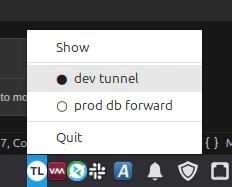
With Tunnel Launcher I no longer have to remember the exact ssh -L flags for each project. One click in the tray and the tunnel is up.
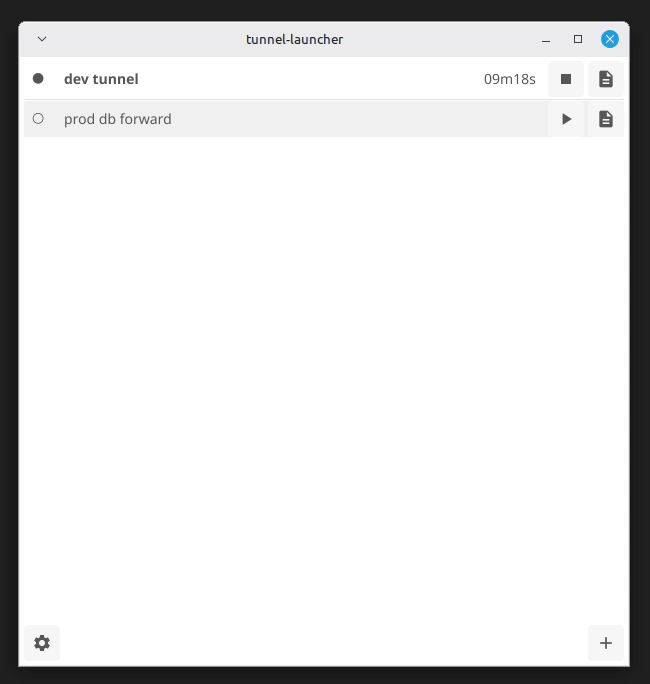
The most important feature is that you can quickly start and stop tunnels from
your tray. The GUI also has Add and Edit forms, so no config file editing is
required. Each tunnel uses the familiar SSH style specification, like
-L 9000:localhost:9000 for local forwards, -R for remote forwards, and -D
for a dynamic SOCKS5 proxy. Authentication tries an explicit identity file
first, then falls back to ssh-agent, and finally to the standard default
identities. Host keys are enforced against a known_hosts file in the app config
directory using trust on first use.
Launching applications
Another feature of Tunnel Launcher is the per-tunnel launch app. You can attach a GUI program to a tunnel, for example a graphical database client, and it starts automatically when the tunnel opens. When you close that program the tunnel closes with it, which keeps your forwarded ports tidy. There is also an in-memory connection log per tunnel, reachable from a button next to the toggle.
Tunnel Launcher helps me to keep my development environment reproducible by making the tunnels for each project a one-click affair.
Are you a software developer and do you want to help test the Windows or package a macOS release? File an issue on Github:
https://github.com/mevdschee/tunnel-launcher
Enjoy!