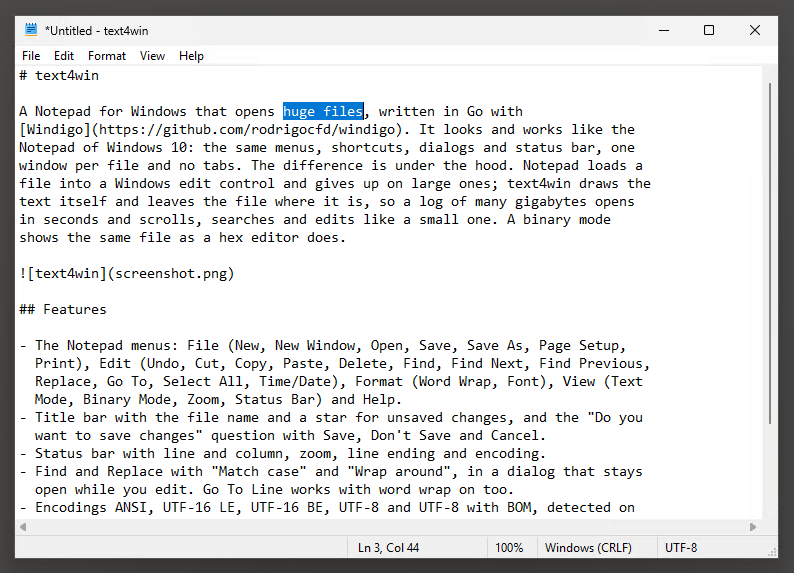
Notepad was the one tool on Windows that everybody relied on. It started in an instant, it showed you the text and it got out of your way. For over thirty years it did not need a roadmap. Then Microsoft found it and started improving it. So I wrote the Notepad they should have left alone:
See: https://github.com/mevdschee/text4win
How to ruin a text editor
It started small. In 2018 the Edit menu got “Search with Bing”, because surely that is what you want from a text editor. This is the same Windows that opens your Start menu searches in Edge, whatever browser you have chosen. In 2019 Microsoft started moving Notepad to the Microsoft Store, so it could “be updated faster”. Nobody had asked for a faster changing Notepad.
In 2023 it got tabs. With the tabs came a Notepad that remembers things. Close it without saving and your text is still there the next time, kept in a folder called TabState, deep in your profile. Forensic tools now ship parsers for that folder. The scratchpad that forgot everything became the scratchpad that forgets nothing.
In 2024 it got AI. Ctrl+E, once the Bing shortcut, became “Explain with Copilot”. Then came “Rewrite”, which asks you to sign in with a Microsoft account and to pay with AI credits. To edit a text file. In the same year Microsoft removed WordPad and told us to use Notepad for our text files instead.
In 2025 it got bold, italic, Markdown and tables, plus “Write” and “Summarize”.
And in February 2026 it got the thing every feature list ends with: a remote
code execution bug. CVE-2026-20841 scored 8.8 and was caused by links in a
Markdown file. The old notepad.exe was not affected. Of course it was not, it
does not know what a link is.
After the backlash Microsoft started “removing Copilot” from Notepad this spring. The button is now called “Writing tools” and the switch sits under “Advanced features”. The AI is still there.
What I want from Notepad
- No tabs. One file, one window.
- No account, no credits, no cloud.
- No AI, also not under another name.
- No memory. What I do not save is gone.
- No formatting. Text is text.
- No network, no Bing, no Edge.
If Microsoft doesn’t do it, we will
text4win is Notepad as it was in Windows 10: the same menus, the same shortcuts, the same dialogs and the same status bar. It is a single exe written in Go, and the MSI installs it for your user without admin rights. The only network access is the update check, and that only runs when you ask for it in the Help menu.
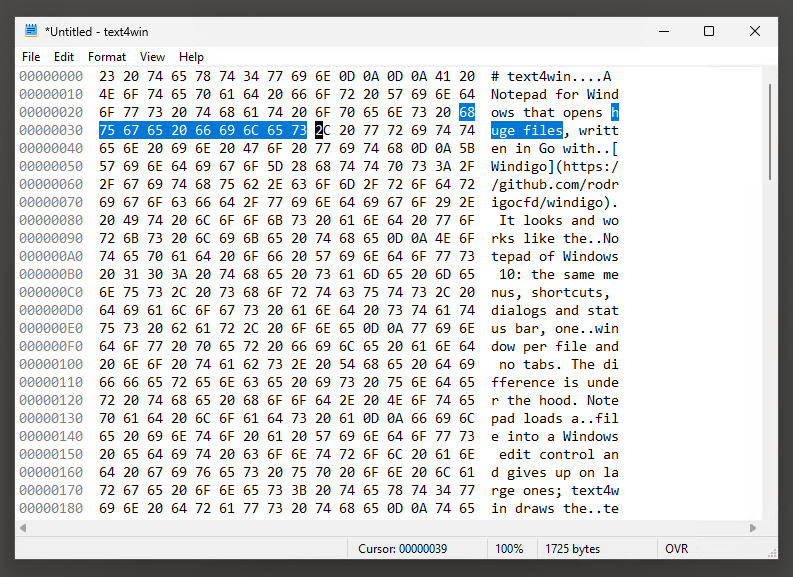
I did allow myself two improvements, both for the same reason: they are about files, not about features. It opens huge files, because a log file of many gigabytes is still just text. And it has a binary mode (Ctrl+B) that shows the same file (maintaining cursor position) in a hex editor view. That is it. There is no settings screen to turn things off, because there is nothing to turn off.
Here you go: https://github.com/mevdschee/text4win/releases
Links
- GitHub.com - mevdschee/text4win
- Notepad’s new Markdown powers served with a side of remote code execution
- Microsoft just put this controversial Notepad feature behind a paywall
- Microsoft finally begins removing Copilot from Notepad, but the AI still persists
- TomsHardware.com - Microsoft retires WordPad after 28 years
- Velociraptor.app - Notepad TabState forensic artifact