In 2014 I wrote a console version of the game 2048 in a single C file. It was a
small weekend project of under 600 lines, but it became one of my most
successful open source projects. Today 2048.c has about 670 stars and over 200
forks on GitHub, the README was translated to Spanish and it was packaged in
Debian, so you can install it with sudo apt install 2048. This week I released
a new game in the same spirit: tetris-together.c, a multiplayer tetris for the
terminal.
Why 2048.c worked
I think 2048.c became popular because it is easy to get started with. You
download one file, you compile it with gcc -o 2048 2048.c and you play. There
is no build system to learn, no library to install and no package manager
involved. People used it to learn C, to learn how terminal games work and to
have something to play on a server over SSH. Because it has no dependencies it
was also easy for distributions to package it.
Same rules for tetris-together.c
I applied the same design rules to the new game. It is a single C file without dependencies, it only uses the C standard library and the POSIX interfaces that every Linux system has. You build and run it like this:
make
./tetris-together
The Makefile is only there for convenience, it runs the compiler with -std=c99
and links the math library. The game does not use ncurses. It puts the terminal
in raw mode using termios and draws with ANSI escape codes. To keep the screen
calm it only redraws the cells that changed and it uses synchronized output to
avoid tearing.
Maximum compatibility was the other goal. The game uses truecolor when the
terminal announces it via COLORTERM and you can fall back to 256 colors with
--256. It scales with the size of your terminal, from a compact 78x24 layout
up to double size boards at 130x46. The networking is plain TCP on port 9471 and
the local network discovery is a small mDNS (DNS-SD) implementation inside the
same file, so it does not need Avahi or any other service to be installed.
What the game does
You can play a classic marathon, play against bots (easy, normal or hard) or host a game for up to 100 players:
./tetris-together --bots 2
./tetris-together --host
./tetris-together --join
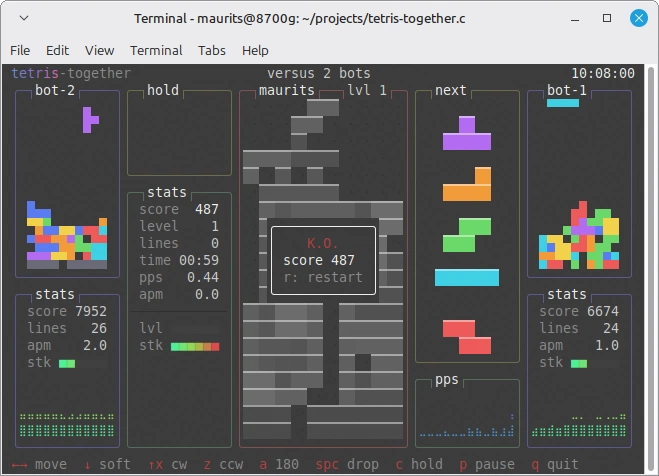
When you join without an address the game finds hosted games on the local network. All players get the same piece sequence and they form a ring: cleared lines are sent as garbage to the player on your right, and you receive garbage from the player on your left. Your board is shown large in the middle and your two neighbours in the ring are shown as smaller boards on either side. When a player is knocked out the next player in that direction takes their place.
The rules follow modern tetris: SRS rotation with wall kicks, the 7-bag randomizer, hold, a 5 piece preview, a ghost piece, lock delay, T-spins, back-to-back, combos and all clears. The graphics are inspired by btop, with rounded boxes, gradient meters and braille graphs for your pieces per second and stack height.
Written with AI assistance
I want to be honest about how this was made. Where I typed 2048.c by hand, this game was written with AI assistance. I decided on the design, the rules and the constraints, and I reviewed, played and tested the result, but a lot of the code was generated. It is about 2700 lines, which is a lot more than 2048.c, and I would not have built a multiplayer game with mDNS discovery in a single week without these tools.
I know that many people are skeptical of AI generated code and I share some of that skepticism, as you can read in my earlier posts. I would still like to ask you to judge this project for what it is. Read the code, compile it, play it with your colleagues over the local network and tell me what you think. If you find a bug or something that can be done simpler, please open an issue or a pull request.
What about the future?
2048.c has been around for twelve years and I am still happy every time someone
mentions it. I hope tetris-together.c can be an equally great success: a game
that people play during lunch, that they use to learn how terminal programs and
network code work, and that maybe one day can be installed with apt as well.
Enjoy!