I have wanted this app for a long, long time. I want to offer several Windows users a shared folder that is secure and easy to use. The folder lives on a Linux server and is reachable over SFTP. I could not find something good and now I have built it myself:
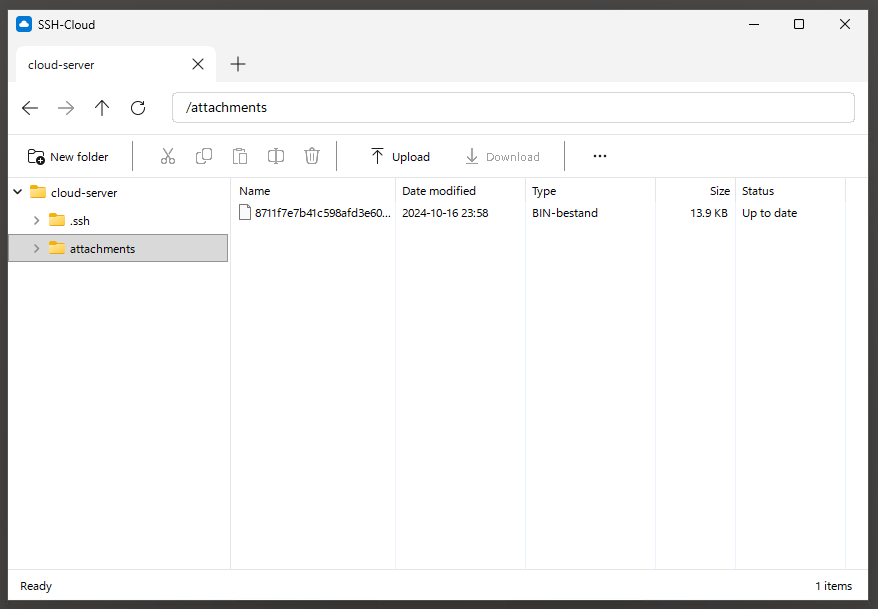
See: https://github.com/mevdschee/ssh-cloud
Years of disappointment
A Linux server that you can SSH into already is secure storage. All I wanted was a simple way for a group of Windows users to share files there. It had to be easy enough for people who never heard of SSH, and they should never overwrite each other’s work by accident. I tried SFTP drive solutions that mount the server as a drive letter. I tried file transfer clients, sync tools and self hosted cloud suites. I even paid for software. Every time I was disappointed. The drives were slow, Explorer hung while waiting for the network and applications locked up when the connection dropped. Sync tools caused conflicts that were hard to understand. The tools were buggy, full of options, and generally hard to use and sometimes even hard to install.
It does one thing
SSH-Cloud shows a folder on your server as an Explorer-like window. That is it. Rename, move, copy and delete happen directly on the server. To work on a file you drag it out, edit it locally and drag it back. There is no sync engine, no daemon, no database and no drive letter. On the server it needs nothing but OpenSSH, so any machine you can SSH into becomes your cloud. The users can share one account on the server, each with their own SSH key, and everything travels over an encrypted SSH connection. You can log in with your SSH agent, Pageant, a key file or a password.
The great thing about this software is that it does only one thing and it does that well. You cannot compare it with the great open source projects like WinSCP, FileZilla, rclone or Nextcloud. They aim to cover many use cases and they do that well. SSH-Cloud is only for a self hosted shared folder on an SSH (SFTP) server.
Never lose work
Because there is no editing in the cloud, the only risk is that you overwrite someone else’s changes. Next to every file SSH-Cloud keeps a small hidden file with the SHA-256 hash and size. The app also keeps a local list of the files you transferred. When you drag a file back it checks whether the file on the server is still the version you downloaded. If someone changed it in the meantime, or you upload a different file with the same name, it asks before it overwrites. Uploads go to a temp file first and get renamed into place, so a dropped connection never leaves a half written file.
There are no locks. Two people can upload at the same time and the server decides who was first, using atomic renames. I wrote stress tests with many concurrent uploads to make sure exactly one of them wins and the other one gets the question.
How I built it
SSH-Cloud is written in Go with windigo, just like otp4win. It is a real Win32 app that draws with GDI, so it is fast over RDP and it runs under Wine. It has tabs for several connections, a folder tree and Fluent icons, so it feels at home on Windows 11. I build, test and release it from Linux with one release script that produces an MSI and publishes it on GitHub. You can read how that works in my previous post: Building native Windows apps in Go on Linux.
The SSH and SFTP parts use golang.org/x/crypto/ssh and pkg/sftp. All the
logic outside the window is portable Go, so I can test it on Linux against an
in-process SSH server.