I help family, friends and a few small businesses with their computers. For years I did that with TeamViewer QuickSupport and Microsoft QuickAssist. These tools work well. But I became more and more uneasy about asking people to install them. So I built my own remote support tool, with security as the main goal:
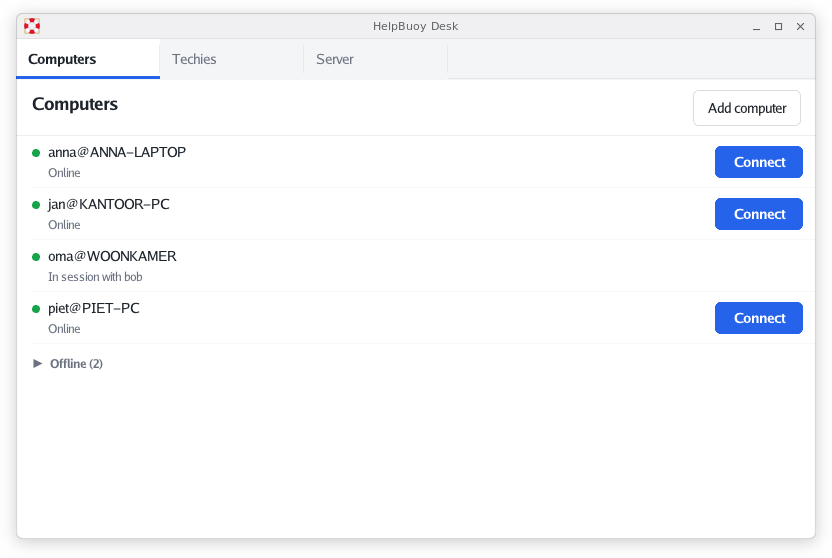
See: https://github.com/HelpBuoy/HelpBuoy
Remote support tools are a scammer’s favorite
TeamViewer, AnyDesk and RustDesk are the standard tools of the tech support scam. Someone calls and claims to be from the bank, Microsoft or the police. They ask the victim to install AnyDesk and to read out the ID and password. A few minutes later they are logged in to the online banking.
The tools make this easy. Anyone can download them. The ID and password are made to be read out over the phone, so a stranger can connect from anywhere in the world. The software has file transfer, a clipboard, unattended access and sometimes a remote shell. The vendors seem to be targets too: TeamViewer had to explain a wave of account takeovers in 2016 and an intrusion in its corporate network in 2024. AnyDesk had its production systems breached in 2024 and had to revoke its code signing certificate.
RustDesk is open source and you can host its server yourself. That is a good step. But the client still has a public ID and password, it still has file transfer and unattended access, and scammers use it with the public servers just like they use AnyDesk.
I wanted something I could hand out without fear
When I install a remote support tool on my mother’s computer, I am also installing it for every scammer that calls her. I did not want that anymore. I wanted a tool that I could give to people without being afraid that they would get hacked through it. That means it should be useless to anyone except the techies I trust, even when the user is tricked into doing what the caller says.
There is no ID to read out
HelpBuoy has no IDs and no passwords. On first start the app makes its own Ed25519 key and asks for the address of a server. The user sends the public key to the techie over WhatsApp or email. The techie registers that key on the server. Only then the computer shows up in the techie’s list. A stranger cannot connect to a computer that was not registered on the stranger’s server, and there is no cloud where everybody meets.
Once installed, the app never asks for a server address again. It stores the address after the first successful connection and connects to it by itself on every start. It also pins the key of the server on that first connection. If the server key ever changes, the app stops and warns. It does not continue until the user confirms the new key with the techie.
The server is self-hosted and closed. You run it on your own pc or on a server and there is no sign up. Every techie has to be registered with their own Ed25519 public key. A techie that is not registered cannot log in, so nobody can offer tech support to your users unless you add them.
No features scammers love
Every session starts with a question on the screen of the user. It shows the name of the techie and the fingerprint of the techie’s key. Without “Allow” the techie sees nothing. The app remembers the key of every techie, so when a techie shows up with a different key, the question carries a warning.
Pressing Esc or closing the app ends the session at once. The app does not start with Windows and has no background service, so there is no unattended access. You cannot black out the screen and the controls are automatically disabled on privileged applications. When the window is closed the computer is offline for everyone.
A session sends the screen from the computer to the techie, and sends the mouse and keyboard input back. There is no file transfer, no clipboard, no shell and no audio, and there is no setting to turn these on. A scammer who gets in still has to do everything by hand, while the user watches and can press Esc.
I love Debian
I run my servers on Debian, and I wanted HelpBuoy to feel at home there. The
server comes as a Debian package. It runs as a systemd service under its own
system user, with its state in /var/lib/helpbuoy-server. The unit file uses
the systemd sandboxing options: no capabilities, a read-only system, no access
to home directories and a system call filter. You manage it with
helpbuoy-serverctl, so adding a techie is one command. The desk app also has a
built in server, so you can start without a server at all.
The Windows client is written in Go with windigo, just like SSH-Cloud and otp4win. There is a Linux client for X11 too, and the desk app for the techie runs on Windows and Linux. Everything is built and released from Linux with one script, as described in Building native Windows apps in Go on Linux.
Free and open source
HelpBuoy is MIT licensed and free for private and business use. If you use it for your business you can buy email support. That is also how I hope to keep the project going.