I wrote otp4win, a small TOTP client for Windows. I built it in Go on my Linux machine. The build, the installer, the release and even the updates all run from Linux.
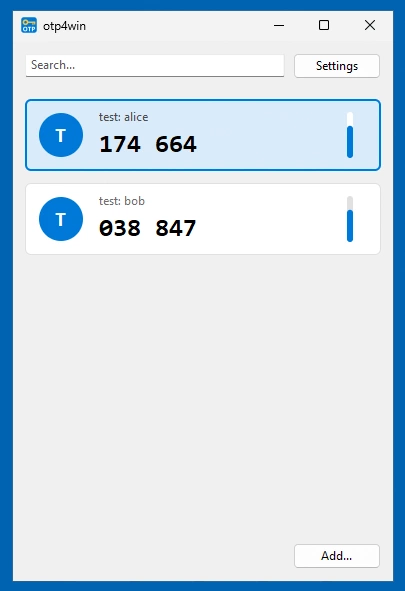
See: https://github.com/mevdschee/otp4win
Linux at home, Windows over RDP
Go is my favorite language and Linux is my favorite platform. Some businesses still run their work on Windows, so now and then I log into a Windows VM over RDP. The tools on that VM should start fast and look like they belong there.
I have built several apps with Fyne, but Fyne and Gio both draw with OpenGL. An RDP session has no GPU, so these apps fall back to software rendering. As a result they feel slow and they do not look like Windows. Classic Win32 apps draw with GDI instead and RDP handles GDI drawing well.
Windigo wraps Win32 in Go
Windigo is a Go library for the Win32
API. It does not use cgo, so GOOS=windows go build works on Linux without a C
cross compiler. This is how otp4win creates its main window:
wnd := ui.NewMain(
	ui.OptsMain().
		Title("otp4win").
		Size(ui.Dpi(380, 540)).
		Center(true),
)
The event handlers are Go closures. Slow work runs in a goroutine and the result
goes back to the GUI thread with wnd.UiThread.
Drawing with GDI
The card list is a custom control with its own WM_PAINT handler. GDI cannot
smooth the edges of circles, so I draw the shapes in a small pixel buffer in Go.
After that GDI draws the text on top and BitBlt copies the result to the
screen.
The secrets are encrypted with DPAPI, so only the current Windows user can read
them. This takes one call to CryptProtectData.
Few dependencies
The app has six direct dependencies. Windigo and x/sys talk to Windows, while
pquerna/otp generates the codes. Next to that dim13/otpauth and protobuf
read Google Authenticator export links and x/image only generates the icon.
The result is a single exe without a runtime or DLLs.
The Windows code lives in files ending in _windows.go and the other files are
portable, so I can test them on Linux with go test.
Building the installer
go-winres adds the icon, manifest and
version info to the exe. Then wixl from msitools builds the MSI from a WiX
file. I ran into three problems:
- wixl removes the old version outside the install transaction, so a failed
upgrade leaves nothing behind. I patch the install sequence with
msiinfoandmsibuild. - The exe needs a version in the MSI file table, because without it an upgrade deletes the exe.
- Windows Installer only compares the first three version numbers. So every release raises at least the third number.
One release script
All I need is release.sh and it runs:
| Tool | Step |
|---|---|
jq |
bump the version in winres.json |
go-winres |
add icon, manifest and version info |
go test |
run the tests |
go build |
build otp4win.exe |
wixl |
build the MSI |
git push |
push the version bump |
gh release |
publish the MSI on GitHub |
I need no CI and no Windows build agent.
Automatic updates
At startup otp4win asks the GitHub API for the latest release. The build sets
the version of the app with -ldflags -X, so it can compare the two. When a
newer version exists the app offers an update. It then downloads the MSI, starts
msiexec and closes, so the installer can replace it. You can turn off this
check in the settings, as it is the only network access of the app.