You can view a PDF in your browser, Firefox does this fast and accurately, no need for Adobe Reader. But even if you want to edit a PDF, you don’t need Adobe Acrobat. On Linux we can install PDF toolkit with a single “sudo apt install pdftk”. But even on Windows there are some good PDF tools available, like PDF24, which even costs nothing. With PDF24 you can do all of the following:
- Merge PDF - Combine or join multiple files into a single PDF quickly and easily
- Split PDF - Easy to use app to split PDF files quickly and easily
- Compress PDF - PDF compressor to reduce the size of PDF files quickly and easily
- Edit PDF - Easy to use online PDF editor to edit PDF files
- Sign PDF - Add a signature to a PDF document
- PDF Converter - Convert files to PDF and from PDF to other file formats
- Images to PDF - User friendly web app to convert photos and other images to PDF quickly and easily
- PDF to images - User friendly web app to convert PDF files to JPG and other images quickly and easily
- Extract PDF images - Easy to use app to extract all embedded images from PDF files
- Protect PDF - Lock PDF files with a password and set permissions
- Unlock PDF - Remove PDF password from PDF files online
- Rotate PDF pages - Easy to use app to rotate PDF pages quickly and easily
- Remove PDF pages - Easy to use app to delete pages from PDF files quickly and easily
- Extract PDF pages - Easy to use app to extract pages from PDF files quickly and easily
- Rearrange PDF pages - Easy to use app for moving pages in PDF files quickly and easily
- Webpage to PDF - Convert a web page via URL to PDF
- Create PDF job application - Create an online job application based on cover letter, CV and attachments
- Create PDF with a camera - Online PDF Scanner for creating PDF files with a camera
- PDF OCR - Recognize text via OCR and create searchable PDF files
- Add watermark - Add a watermark or text as protection to your PDF files
- Add page numbers - Free and easy to use tool to add page numbers to PDF files
- PDF Overlay - Overlay PDFs, e.g. to combine documents with a digital paper
- Compare PDFs - Compare PDF files and see the differences
- Web optimize PDF - Linearize PDF files to optimize for fast web view
- Annotate PDF - Annotate PDF files by highlighting and adding text, images or shapes
- Redact PDF - Blacken areas in PDF files to make them unrecognizable
- Create electronic invoice - Generator for creating electronic invoices like XRechnung and ZUGFeRD
- Create PDF - Create PDF files quickly and easily with PDF24 (e.g. via printing)
- PDF to Word - User friendly web app to convert PDF to Word quickly and easily
- JPG to PDF - User friendly web app to convert JPG files to PDF quickly and easily
While PDF24 works online, via the website, you may also install the software on your PC for better privacy. This is what PDF24 claims:
“The PDF24 Creator is a desktop solution that works offline. Files remain locally on your PC and are NOT uploaded to the Internet. The topic of data protection or GDPR is therefore not a problem.”
To me, this sounded too good to be true, so I did what any security-minded person would do: investigate that claim.
Simplewall - Definitely for advanced users.
Simplewall is firewall software that uses Windows Filtering Platform (WFP) to filter network activity on your computer. Once activated it pops up on every network access and asks you to allow or deny. I downloaded and installed PDF24 and merged two sample PDFs. I used Simplewall to detect network traffic originating from PDF24 and I was pleased that it didn’t detect any.
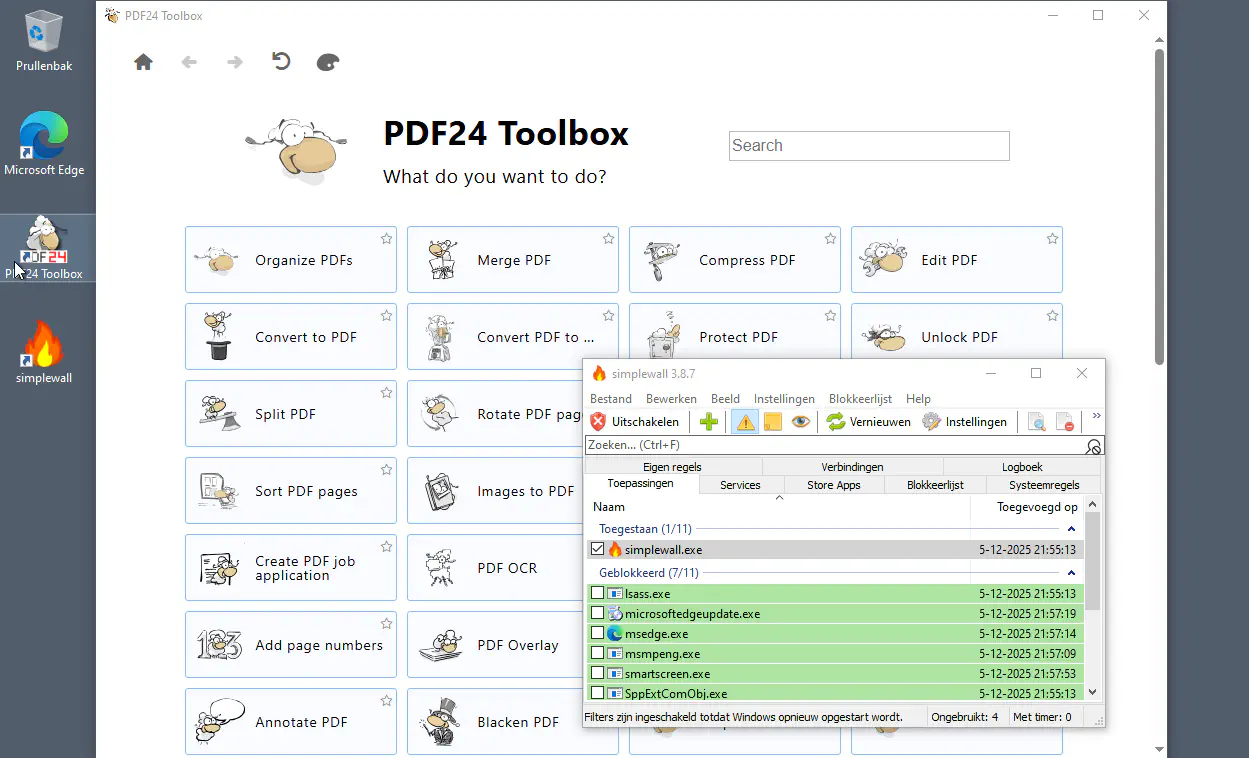
I know that this is not a guarantee that it would never send any network traffic, but it is true that it does its computation offline and that the PDFs are not sent over the network for remote processing.
Conclusion
Simplewall and PDF24 are two great packages that I both recommend. Simplewall is great for detecting privacy leaks. PDF24 is great for everyday PDF editing and it does not only do what it should, it is very user-friendly and it does not cost money. It is made by “2025 Geek Software GmbH” a company that certainly lives up to their slogan “We love PDF”.